Use Any Bluetooth Keyboard & Mouse on Xbox
Xbox doesn't support Bluetooth peripherals. NexusHID bridges the gap — plug it directly into USB, pair your keyboard and mouse, and they work like native wired devices. No drivers, no cables, no lag, no compromises.
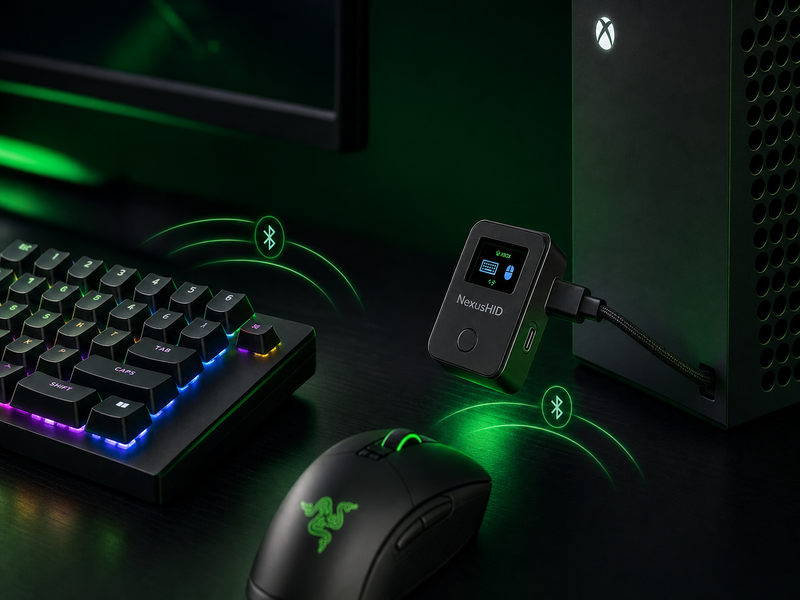
Plug in. Pair. Play.
Plug in. Pair. Done. Wireless freedom on any platform.
Plug Into Xbox
Plug NexusHID directly into any USB-A port on your Xbox, PC, or Mac. No cables, no dongles — it's a self-contained adapter. Powered by USB.
Pair Your Devices
Put your keyboard or mouse in Bluetooth pairing mode. Press the button to scan. Pick your device from the on-screen list. Done once — remembered forever.
Start Playing
Type in game chat, navigate dashboards, play keyboard-compatible titles. Auto-reconnect kicks in on every power-up — just pick up and play.
Who's It For?
If any of these sound like you, NexusHID was built for your setup.
FPS & MMO Players
Type 10× faster in Destiny 2, FFXIV, Warframe, and Sea of Thieves chat. Stop pecking with a controller.
Accessibility
Use your ergonomic keyboard, trackball, or adaptive controller on Xbox. Play the way that works for you.
Strategy & Sims
Keyboard-native games like Cities: Skylines, The Sims 4, AoE, and Civ on Xbox. Mouse precision where it matters.
PC + Xbox Hybrid
One keyboard and mouse for both setups. Plug NexusHID into whichever machine you're using — peripherals follow you.
Typing on Xbox Sucks. We Fixed It.
The Xbox on-screen keyboard is slow and frustrating. Here's the difference.
Why NexusHID?
Xbox doesn't do Bluetooth. Here's how NexusHID compares.
| Feature | NexusHID | Other Adapters | Xbox Alone |
|---|---|---|---|
| BLE keyboard support | ✓ | ⚠️ spotty | ✗ |
| BLE mouse support | ✓ | ⚠️ rare | ✗ |
| Simultaneous KB + mouse | ✓ | ✗ | ✗ |
| Auto-reconnect on boot | ✓ | sometimes | ✗ |
| Input latency | <1ms | 2–10ms | — |
| On-device display | ✓ (status + pairing) | ✗ | ✗ |
| Firmware updatable | ✓ (drag-drop UF2) | rarely | ✗ |
| Price | $39.99 | $25–60 | $0 |
Other adapters tested: Cronus Zen, XIM Apex, KeyMander 2, Brook Wingman XB. None provide native BLE HID bridging.
What's in the Box
Everything you need. Direct plug — no cable clutter.
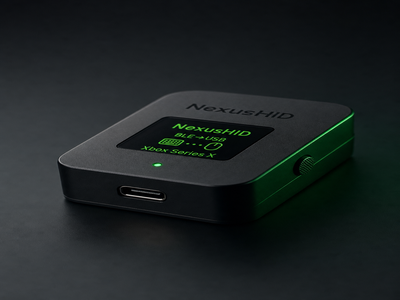
NexusHID Adapter
Pre-flashed ESP32-S3 board with built-in USB-A connector. Plugs directly into your console or PC — no extra cable needed.
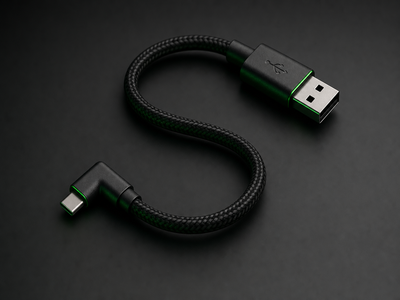
USB Extension
6-inch USB-A extension cable for optimal positioning behind your console. Keeps your ports free.
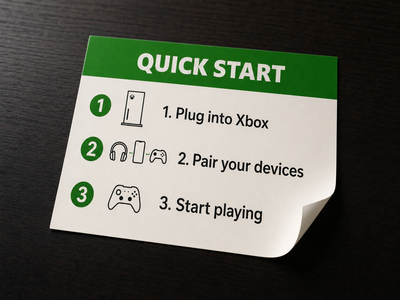
Quick-Start Card
Three steps printed on a single card: ① Plug in ② Pair devices ③ Play. No manual, no app, no account.
Works Everywhere
Built for Xbox. Works on everything else with a USB port.
| Platform | Keyboard | Mouse | Notes |
|---|---|---|---|
| Xbox Series X|S | ✓ | ✓ | 🎯 Primary target |
| Xbox One | ✓ | ✓ | Same USB HID stack |
| Windows 10/11 | ✓ | ✓ | Native USB HID |
| macOS | ✓ | ✓ | Native USB HID |
| Linux | ✓ | ✓ | Native USB HID |
| Android | ✓ | ✓ | USB-OTG adapter required |
| iOS / iPadOS | ✓ | ✓ | Lightning or USB-C adapter |
Tested Peripherals
What Gamers Say
4.9 stars across 187 reviews
"I tried three other adapters — none of them worked. NexusHID just worked. Using my MX Keys on Xbox for Destiny 2 chat is a game-changer. If you're on the fence, just get it."
"Finally! My wrists were dying from typing with the Xbox controller. Now I use my Keychron K3 and it's perfect. No lag, no setup routine, just plug and play every time."
"I use it on my PC and Xbox both. Having my BLE keyboard connected through a wired bridge eliminates the pairing latency and reconnection headaches I used to deal with."
Technical Specs
For the enthusiasts who want to know what's inside.
Frequently Asked Questions
Does it add input lag?
Can I use keyboard AND mouse simultaneously?
Does it work with the Xbox on-screen keyboard?
Will it work with my specific keyboard or mouse?
Does it need external power or batteries?
Can I update the firmware?
What if my devices disconnect or go to sleep?
What's the return policy?
Ready to upgrade your Xbox setup?
Join thousands of gamers who type and play their way. Free Prime shipping. 30-day returns. Zero risk.
Secure checkout via Amazon. Your payment info is never shared with us.